
The Dixie County Jail Roster Explained
The Dixie County Sheriff's Office runs the county jail and the public inmate roster. Sheriff Darby Butler leads the agency. The roster is hosted on SmartCOP Jail View, a vendor system the sheriff links from the homepage as "Arrest Search." It is free. No login was needed during research. Open it at SmartCOP Jail View. The page opens to a "BOOKED Last 24 Hours" list. That makes recent arrests easy to spot before you type a single name.
The county roster covers people booked into the Dixie County Jail. It does not cover sentenced state prisoners. Those records move to the Florida Department of Corrections (FDC), the state prison agency. The roster also leaves out federal and immigration detainees. Federal inmates show up in the Bureau of Prisons system, and immigration holds show up in the ICE locator. Each of these systems is covered below with a direct link, so a failed roster search has a clear next step.
The sheriff does not publish how often the roster updates or how long a released person stays listed. During research, bookings from one day appeared on the next under the 24-hour list. Treat the roster as current but not certified, and confirm anything that matters by phone.
How to Use the Dixie County Jail Roster
You can reach the roster from the sheriff homepage or the direct SmartCOP link. To start, you need very little. A last name is enough for most searches. An approximate arrest date helps narrow common names. The steps below follow the live SmartCOP Jail View layout.
- Open SmartCOP Jail View from the sheriff's "Arrest Search" link or the direct address.
- For a recent arrest, scan the default "BOOKED Last 24 Hours" list before searching.
- For a named person, type at least one search field. Last name works best as a first try.
- Add first name or middle name when a common last name returns many matches.
- Use Begin Booking Date and End Booking Date if you know roughly when the arrest happened. The date boxes use a calendar widget.
- Set Sorted By to Name or Booking Date, then pick Ascending or Descending order.
- Click Submit to run the search. Click Reset to clear the fields and start over.
- In the result, read the name header, race, sex, date of birth, status, booking number, MNI number, booking date and time, age at booking, and bond.
- Click Enlarge Photo for a larger mugshot when you need a clearer image.
- Open the charge rows. Click the "[+]" sign to expand the plain-language charge description.
- Use Print for a clean copy. Use Load more results when the list runs past the visible records.
The sheriff links this roster as the first stop for arrestees held in Dixie County. The screenshot below shows the search form and the recent-booking list a visitor sees first.
You can view the live search page at SmartCOP Jail View for Dixie County, captured here as it loads.
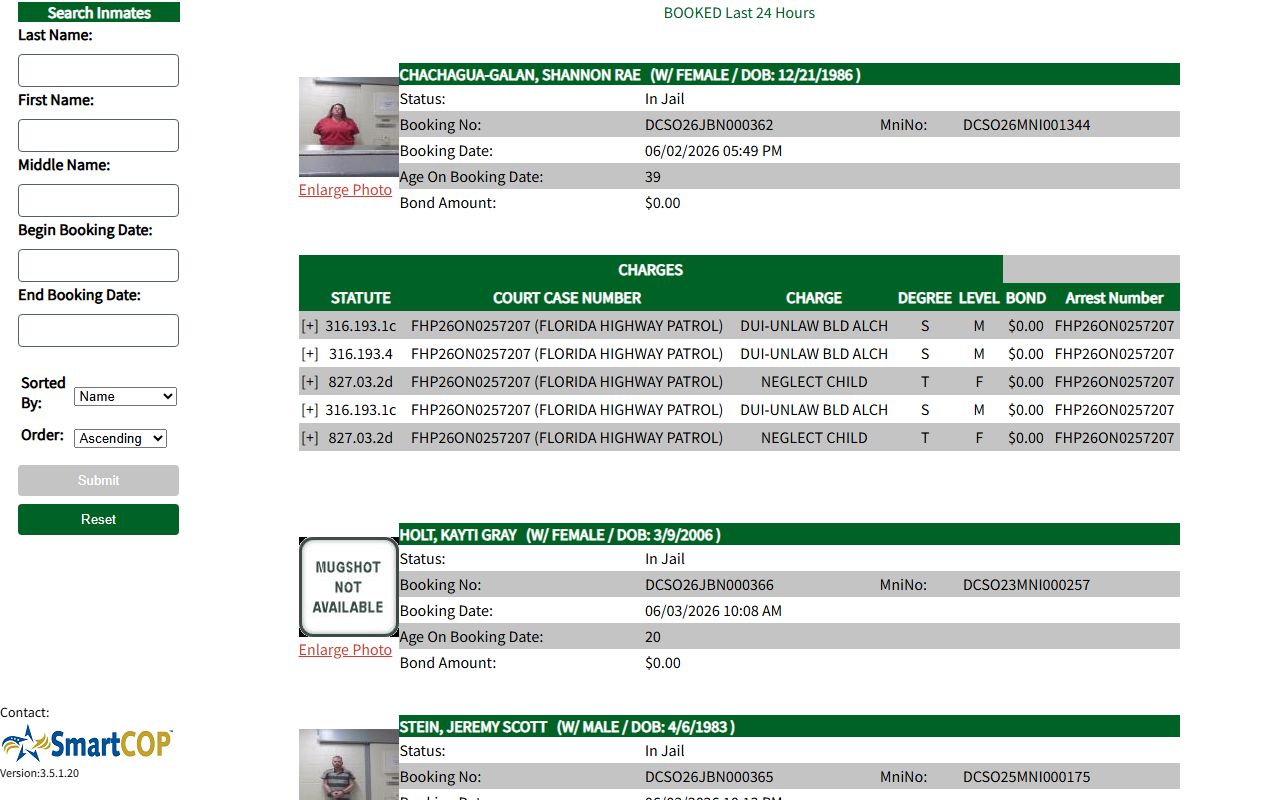
The form fields and the booking list in this image are exactly what you work with when you search for a recent Dixie County arrest.
Dixie County Roster Search Fields
SmartCOP Jail View accepts a short set of search fields. The page asks for at least one criterion when you run a manual search. None of the fields publish a strict format, so the calendar picker handles dates. The release-date fields stay hidden unless a release-type search is chosen. The table lists each field, its type, whether it is required, and any notes from the live form.
| Field Label | Type | Required | Notes |
|---|---|---|---|
| Last Name | Text | At least one field | The page asks for one or more search criteria; last name is the most practical first field. |
| First Name | Text | No | Add it when a common last name returns many matches. |
| Middle Name | Text | No | No format rules shown on the form. |
| Begin Booking Date | Date picker | No | Calendar widget; required format not stated. |
| End Booking Date | Date picker | No | Pairs with the begin date to set a range. |
| Begin Release Date | Date picker | No | Hidden by default; appears with a release-type search. |
| End Release Date | Date picker | No | Hidden by default; pairs with begin release date. |
| Sorted By | Dropdown | No | Choose Name or Booking Date. |
| Order | Dropdown | No | Choose Ascending or Descending. |
If a name brings back too many people, drop a field and search again. The form does not publish wildcard rules, so fewer fields often work better than more. When a recent arrest still does not appear, the booking may not be processed yet, or the spelling may differ.
Note: The roster does not list housing unit, pod, or cell, so call the jail for visit logistics rather than hunting for a cell number in the public record.
What a Dixie County Inmate Record Shows
Each SmartCOP booking entry leads with a mugshot and a name header. The header carries the core identity and custody fields. Below it sits a charges table, one row per charge. A booking number such as DCSO26JBN000362 ties the whole record together. The MNI number, like DCSO26MNI001344, is the master name index that links a person across bookings. The table below pairs each field with what it shows on a typical entry.
| Field | What It Shows |
|---|---|
| Mugshot / Enlarge Photo | Booking photo thumbnail with a larger image link tied to the booking number. |
| Name | Last, first, and middle name in uppercase. |
| Race / Sex / DOB | Header demographics; race is shown as a one-letter code. |
| Status | Custody status such as "In Jail." |
| Booking No | Jail booking ID, for example DCSO26JBN000362. |
| MniNo | Master name index number, for example DCSO26MNI001344. |
| Booking Date | Date and time the booking was entered. |
| Age On Booking Date | The person's age at intake. |
| Bond Amount | Summary bond total shown on the header. |
| STATUTE | The Florida statute or local code tied to the charge. |
| COURT CASE NUMBER | Case line that may name the arresting agency in parentheses. |
| CHARGE | Short charge label for that row. |
| DEGREE | Seriousness grade shown as a letter code. |
| LEVEL | Code such as M or F for misdemeanor or felony. |
| BOND | Bond amount for that single charge. |
| Arrest Number | The arrest number when one is provided. |
The COURT CASE NUMBER field often names the arresting agency in parentheses, such as Florida Highway Patrol or the Dixie County Sheriff's Office. That helps you tell a sheriff arrest from a state-trooper stop. A single case may also stack several charge rows. Each row can stand for a separate count or statute, and the "[+]" expander gives the longer wording. Booking photos shown here are also covered in more depth on the Dixie County jail mugshots page.
Three things are not in the public entry. The roster does not show a court date. It does not show housing or pod. It does not show a release date on the default current-booking view. For court dates and filed charges, check the court system rather than the jail roster.
County, State, and Federal Inmate Lookups
People confuse jail and prison custody all the time. The difference decides which system to search. A pre-trial inmate or a person serving a short county sentence sits in the Dixie County Jail and shows on SmartCOP. A felon sentenced to state prison leaves the county jail and becomes an FDC inmate. At that point SmartCOP is no longer the right tool. The table maps each custody type to the system that tracks it.
| Custody | Where to Look |
|---|---|
| Pre-trial or short county sentence | Dixie County SmartCOP Jail View |
| Sentenced state felon | Florida Department of Corrections (FDC) Offender Search |
| Federal inmate | Federal Bureau of Prisons locator |
| Immigration hold | ICE Online Detainee Locator |
The FDC search covers felony offenders sentenced to state prison or state supervision. Its own page says county jail and county probation are not included. That matters in Dixie County, because the county has both a jail and state prisons in Cross City. Search FDC by name or by a six-character DC number. The screenshot below shows the FDC form and its public-record notice.
The state search form is online at the Florida DOC offender search, shown here as it appears to the public.
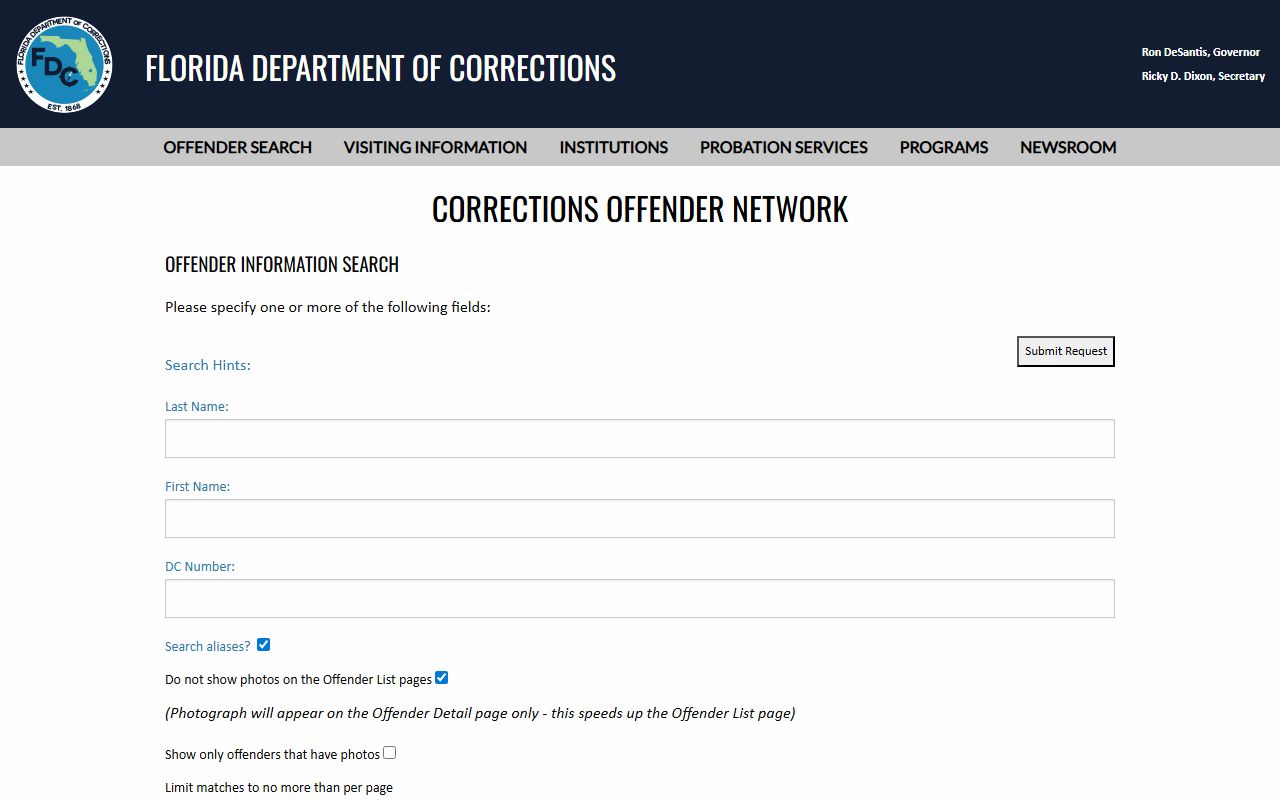
Use this state form for anyone moved from the Dixie County Jail to a Cross City prison after sentencing, since the county roster drops them.
Federal and immigration cases need their own channels. The BOP locator finds federal inmates held from 1982 to the present, by register number or by name. Federal pretrial detainees may instead sit under the U.S. Marshals Service, which lists Dixie among the counties in its Northern District of Florida. The ICE detainee locator tracks people in ICE custody. An ICE detainer in the county jail is not the same as ICE custody; the detainer can hold a person before transfer, while the ICE locator covers custody after transfer. No federal prison or ICE facility sits inside Dixie County.
Other Ways to Locate a Dixie County Inmate
The online roster is the fastest path, but it is not the only one. When a search comes up empty, several offline channels can confirm custody. Phone the jail or the sheriff's office first. For records the roster does not carry, the sheriff's Records Division handles formal requests. Below are the main channels in plain order.
- Jail phone: call the Dixie County Jail at (352) 498-1231 for status or facility questions; the jail runs 24/7.
- Sheriff main line: call (352) 498-1220 during office hours for general sheriff and records questions.
- In person: public-record requests go to the sheriff's office at 214 NE Highway 351, Suite L, not the jail address.
- Records request: ask the Records Division for booking records, arrest reports, or photos not posted online.
- State and federal locators: use FDC for sentenced state inmates and BOP or ICE for federal and immigration cases.
- VINELink: use Florida VINELink for custody and release notification where it is supported.
The Records Division is staffed by Kishi Driggers. You can request a record in person or by written mail. Mailed requests go to Dixie County Sheriff's Office, P.O. Box 470, Cross City, FL 32628, and should include a self-addressed stamped envelope large enough for the documents. If the case is under investigation, the request will not be returned, and a mailed requester is told by return mail. The Records Division page is shown below.
The sheriff outlines its request process on the Dixie County Sheriff Records Division page, captured here.
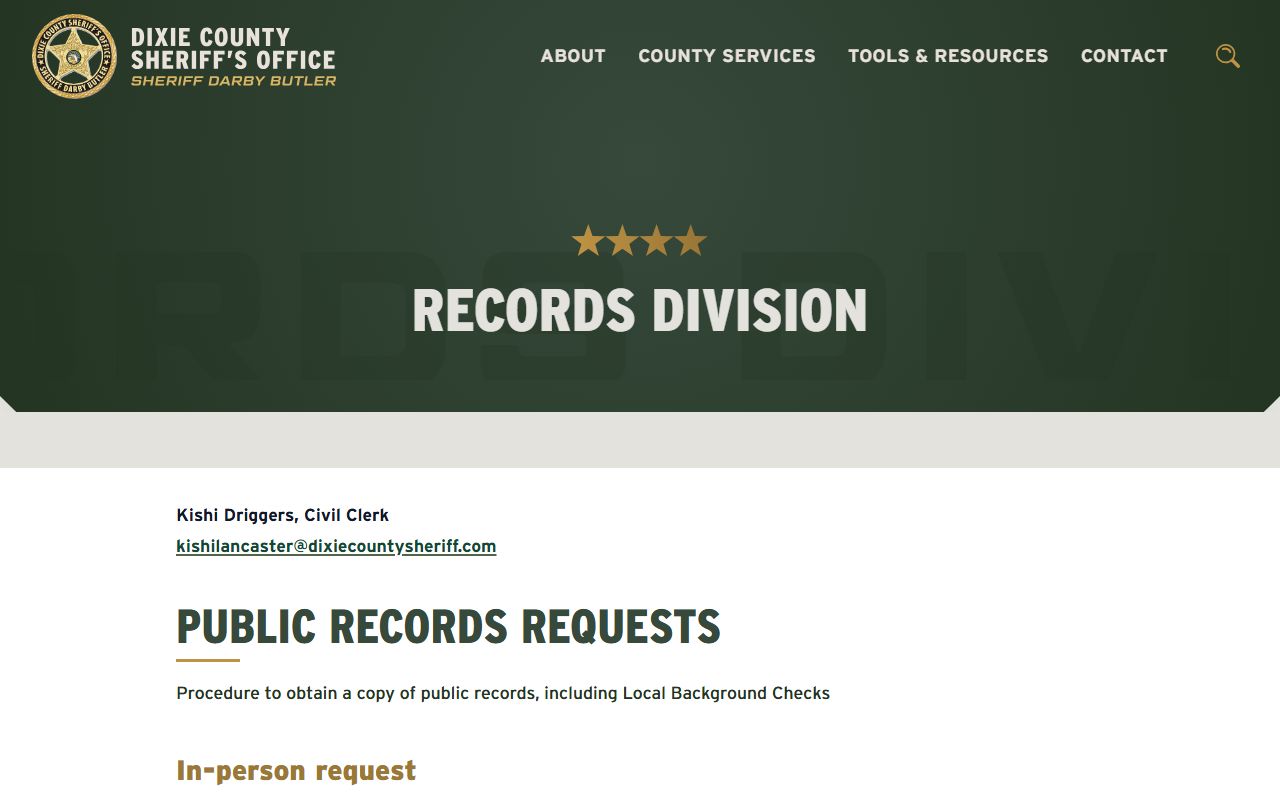
Use this channel when a booking photo, arrest report, or older record is not visible on the live roster.
Note: There is no official Dixie County Sheriff inmate-search app, and Dixie Alert is an Everbridge resident alert system, not an inmate lookup tool.
Dixie County Jail and Nearby Facilities
One sheriff-run jail serves Dixie County. Two state prison units also sit in Cross City, run by the Florida Department of Corrections rather than the sheriff. The jail holds local arrestees and pre-trial detainees. The state units hold sentenced adult men and use the FDC locator. The cards below give the main jail and the state-prison address shared by the Cross City units.
Dixie County Jail
386 NE 255th Street
Cross City, FL 32628
(352) 498-1231
Open 24/7
Dixie County Sheriff's Office
214 NE Highway 351, Suite L
Cross City, FL 32628
(352) 498-1220
Mon-Fri 8:30 AM-5:00 PM
The jail and the sheriff's office are separate addresses, so confirm where to go before you drive. For someone moved to a Cross City prison, see the Cross City Correctional Institution page or the Dixie County Jail page for facility detail.
Booking and Intake in Dixie County
An arrest starts the jail record. The arresting agency brings the person to the Dixie County Jail when local detention fits the case. At intake, staff inventory property and money, run a medical screening, and process the booking. Once the booking is entered, the SmartCOP record shows the name, booking number, booking date and time, mugshot, and charges. The sheriff does not post an exact refresh time, but recent bookings appeared on the next day during research.
People who do not bond out see a judge within 24 hours of arrest. At first appearance, the judge states the charge or charges and the bond amount. This can happen with the judge in the room or by telephone or Polycom video. After intake, the inmate moves to general population. Housing is assigned by charge classification, felony or misdemeanor, and prior convictions. Classification is the jail's process for deciding security and housing.
Bond is the money or set of conditions that secures release and a promise to return to court. A cash bond is the full amount paid to the court. A surety bond is posted through a licensed bondsman for a fee. The roster shows a summary bond and a per-charge bond, which may read $0.00 on some charges. Call the jail to confirm the amount, the accepted payment, and whether any hold blocks release before you travel.
Visiting a Dixie County Inmate
Dixie County Jail uses HomeWAV video-chat visitation. The sheriff's detention page names HomeWAV as the visit system and links the sign-in page. It does not publish a weekly schedule, visit length, dress code, or visitor-approval rules. Because the posted mode is video, the safest step is to create or sign in to a HomeWAV account, then call the jail to confirm available times before you assume a walk-in visit. Sign in at HomeWAV.
The Cross City state prisons use a different system entirely. FDC requires approved visitors and weekly scheduling, with profile hours of 9:00 AM to 3:00 PM. The table sets the county jail next to the state units so the difference is clear. The schedule cell for the jail is marked honestly, since the sheriff page does not publish set days and times.
| Facility | Visit Type | Schedule |
|---|---|---|
| Dixie County Jail | HomeWAV video chat | Not published - confirm with the jail |
| Cross City Correctional Institution | In-person, approved visitors | 9:00 AM-3:00 PM; weekly scheduling required |
| Cross City East Unit | In-person, approved visitors | 9:00 AM-3:00 PM; weekly scheduling required |
For the state units, visitors age 12 and up must apply and wait roughly 30 days for approval. Approved visitors then book a slot through the weekly scheduling form. Those rules come from FDC, not the sheriff, so they apply only to the prison units.
Mail and Phone for Dixie County Inmates
Dixie County Jail accepts postcards only, with one clear exception. Letters and most other mail are returned to the sender. Legal and privileged mail is handled apart and opened in the inmate's presence. Inmates may not receive packages except legal materials, and express mail that requires a signed receipt is not accepted. Mail is delivered Monday through Friday except holidays, and all non-legal mail is opened and checked for contraband.
Inmates cannot receive phone calls. They can place collect calls from the housing units between 8:00 AM and 10:00 PM, with no exceptions. The phone provider is AMTEL, reached at (800) 849-6081. The sheriff page does not publish call pricing, so confirm rates with AMTEL. Keep messages brief and plan around the calling window, since the inmate must start every call.
Sending Money to a Dixie County Inmate
There are three ways to put money on a Dixie County inmate account. You can mail a money order, made out to the inmate, with only the money order in the envelope. You can deliver cash or a credit or debit card in person to the jail lobby and use the kiosk there. You can deposit online at commissarydeposit.com. Canteen funds carry a firm deadline. Money for canteen must post no later than midnight Sunday, the week before the canteen order. The sheriff page does not publish deposit fees, so ask before you send a large amount.
Note: Confirm the person is still in Dixie County Jail custody before you send money or set up a visit, since a transfer to state prison shifts both the deposit and the visit rules.